FM WhatsApp Top 10 Best Features That Make It Better?
There is a reason why millions of people around the world have switched from the official WhatsApp to FM WhatsApp. It is not just one thing. It is a collection of amazing features that make messaging faster, more private, and more enjoyable.
The official WhatsApp works fine. It is reliable. It is secure. But it is also limited. You cannot change how it looks. You cannot hide your online status properly. You cannot send large files. You cannot save status updates. The list of missing features goes on and on.
FM WhatsApp fixes all of these problems. It takes everything good about WhatsApp and adds over 200 extra features. Some of these features are small quality-of-life improvements. Others are complete game-changers.
In this guide, I will walk you through the top 10 best features of FM WhatsApp. Whether you are new to modified apps or switching from GB WhatsApp, this list will show you why FM WhatsApp is worth your attention.
Let us dive right in.
Feature 1: Built-in Status Saver
Let me start with the feature that most people love the most. FM WhatsApp has a built-in status saver. This means you can download any status update from your contacts directly to your phone. No screenshots. No screen recording. No third-party apps.
When you view a status on FM WhatsApp, you will see a download icon. One tap and the photo or video is saved to your gallery. The quality remains exactly the same as the original. No compression. No watermarks.
You can also use the hidden status saver menu to download multiple statuses at once. Go to the status tab, tap the menu button, and select “Status Saver.” You will see all available statuses with download buttons next to each one.
GB WhatsApp also has a status saver, but FM WhatsApp works faster and organizes saved files better. Your saved statuses go into clearly labeled folders. You never have to search through messy directories.
This feature alone is enough reason to switch. How many times have you wanted to save a beautiful photo or funny video from a friend’s status? With FM WhatsApp, you finally can.
Feature 2: Advanced Privacy Controls
Privacy is a huge concern for most messaging app users. The official WhatsApp gives you very basic privacy options. You can hide your last seen, but then you cannot see anyone else’s. You can turn off read receipts, but then you lose the ability to see when your messages are read.
FM WhatsApp changes all of that. It offers advanced privacy controls that give you complete freedom.
Here are some of the privacy features you get:
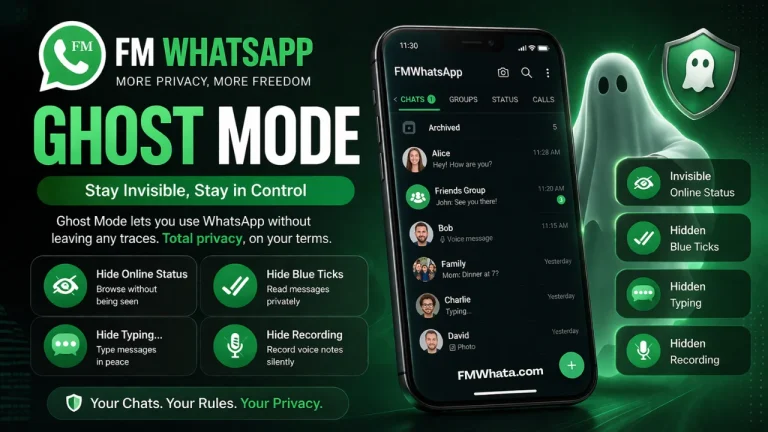
Hide Blue Ticks While Seeing Others’ Blue Ticks: This is the feature everyone wants. You can read messages without sending read receipts. At the same time, you can still see when others have read your messages. The official WhatsApp does not allow this. FM WhatsApp does.
Hide Online Status: The green dot next to your name disappears. No one can see when you are actively using the app.
Freeze Last Seen: Your last seen time stops updating. People cannot tell when you were last online.
Hide Typing Indicator: When you are typing a message, the other person does not see the “typing…” notification. You can take your time composing messages.
Hide Recording Indicator: Similar to the typing indicator, you can hide when you are recording voice messages.
Show Blue Ticks After Reply: This is a unique FM WhatsApp feature. Your blue ticks are hidden by default. But once you reply to a message, the blue ticks appear. The sender then knows you have read their message. This balances privacy with courtesy.
You can also customize privacy settings for specific contacts. Want to hide your online status from your boss but show it to your friends? FM WhatsApp lets you do that. The level of control is unmatched.
Feature 3: Custom Themes and Full Interface Customization
The official WhatsApp looks the same for everyone. Green bubbles. White background. No options to change anything. After years of using the same design, it gets boring.
FM WhatsApp changes everything about how your app looks. You can completely transform the appearance of WhatsApp. There are thousands of custom themes available. Each theme changes the colors, backgrounds, chat bubbles, fonts, and icons.
You can find themes for every taste. Dark themes. Pastel themes. Neon themes. Minimalist themes. Nature themes. Holiday themes. Whatever style you like, there is a theme for it.
But customization goes beyond just applying themes. You can also:
- Change the style of ticks (sent, delivered, read)
- Change the color of the app icon
- Customize the navigation bar
- Change fonts and text sizes
- Add custom backgrounds to chats
- Modify the shape of chat bubbles
- Change the checkmark icons
You can even create your own theme. FM WhatsApp includes a theme editor. You can choose every color manually. You can pick your own background image. You can design the perfect look for your messaging app.
GB WhatsApp also offers themes, but the FM WhatsApp theme store is larger and better organized. Finding and applying themes is easier. The customization options go deeper.
Feature 4: Send Large Files Without Compression
One of the most frustrating limits of the official WhatsApp is file size. You cannot send videos larger than 16MB. You cannot send audio files larger than 16MB. When you send photos, WhatsApp compresses them. The quality becomes terrible.
FM WhatsApp removes these limits completely. You can send files up to 1GB in size. That is 1,000MB. Think about what this means. You can send full-length movies. You can send high-quality video clips. You can send entire albums of photos without compression.
The quality of your images and videos stays exactly the same as the original. No compression. No quality loss. What you send is what the other person receives.
You can also send more file types. The official WhatsApp only supports a few formats. FM WhatsApp supports almost every common file type. Documents, APK files, ZIP files, and more.
For people who share media regularly, this feature is essential. Content creators, photographers, videographers, and business users all benefit from larger file limits and better quality.
Feature 5: Schedule Messages
Have you ever forgotten to wish someone on their birthday? Have you ever needed to send an important message at a specific time but knew you would be busy? Message scheduling solves these problems.
FM WhatsApp includes a built-in message scheduler. You can write a message now and choose exactly when it should be sent. The app will automatically deliver it at your chosen time.
Here is how it works. Type your message as usual. Instead of tapping the send button, look for the schedule icon. It looks like a clock or calendar. Tap it. Choose the date and time you want the message to be sent. Confirm. That is it. FM WhatsApp will handle the rest.
You can schedule messages to individuals or groups. You can schedule one-time messages or repeating messages. You can edit or cancel scheduled messages before they are sent.
This is perfect for birthday wishes, work reminders, meeting confirmations, or any message that needs to be sent at a specific time. Never forget an important message again.
GB WhatsApp has a similar feature, but FM WhatsApp’s scheduler is more reliable and easier to use.
Feature 6: Auto-Reply and Away Messages
If you use WhatsApp for business or if you are someone who gets many messages, auto-reply is a lifesaver. FM WhatsApp lets you set automatic replies for when you cannot respond immediately.
You can set different auto-reply messages for different situations. For example:
- “I am currently driving. I will reply when I reach my destination.”
- “I am in a meeting. I will respond within two hours.”
- “Thank you for your message. I will get back to you soon.”
You can also set away messages that activate during specific hours. If you do not want to be disturbed at night, set an auto-reply that tells people you will respond in the morning.
The auto-reply feature can be turned on and off manually. Or you can schedule it to activate automatically at certain times. You can even set different auto-replies for different contacts.
This feature is especially useful for small business owners, freelancers, and anyone who uses WhatsApp for customer support. Your customers get an immediate response even when you are unavailable.
Feature 7: Hide Media from Gallery
This is a small feature but incredibly useful. When you receive photos or videos on the official WhatsApp, they automatically appear in your phone’s gallery. Anyone who looks through your photos can see your WhatsApp images. This can be embarrassing or even unsafe.
FM WhatsApp lets you hide media from your gallery. When you enable this feature, all incoming media stays inside the app. It does not show up in your phone’s gallery or photo albums.
You can still view the media inside FM WhatsApp. You can still save specific images to your gallery if you want. But by default, everything stays private.
This is perfect for sensitive images, private photos, or any media you do not want others to see when they browse your phone.
You can also choose to hide media from specific chats only. Maybe you want most media to appear in your gallery, but media from certain contacts should stay hidden. FM WhatsApp allows this level of control.
Feature 8: DND Mode (Do Not Disturb)
Sometimes you need peace. Sometimes you do not want to be disturbed by constant message notifications. The official WhatsApp does not have a true Do Not Disturb mode. You can mute individual chats, but you cannot pause all WhatsApp activity completely.
FM WhatsApp has a DND Mode. When you enable it, FM WhatsApp stops all internet activity. You will not receive any messages. You will not get any notifications. The app essentially goes to sleep.
But here is the clever part. When you turn off DND Mode, FM WhatsApp catches up. All the messages you missed will be delivered. You will see everything that was sent while you were away.
You can schedule DND Mode to activate automatically. Set it to turn on during your sleeping hours, during work meetings, or whenever you need focused time. You can also whitelist specific contacts. Messages from whitelisted contacts will still come through even when DND Mode is on.
This feature helps you maintain healthy boundaries with technology. You decide when WhatsApp can reach you, not the other way around.
Feature 9: Increased Group Limits and Better Group Controls
WhatsApp groups are great for staying connected with friends, family, or colleagues. But the official WhatsApp has strict limits. You can only have 256 members in a group. You cannot send broadcast messages to more than 256 contacts at once.
FM WhatsApp increases these limits significantly. You can create groups with up to 600 members. You can send broadcast messages to 600 contacts at once.
But bigger numbers are not the only improvement. FM WhatsApp also offers better group controls:
Anti-Revoke: When someone deletes a message in a group, FM WhatsApp still shows it to you. You can see what was deleted. This prevents people from saying something and then erasing it.
Group Announcement Mode: You can turn a group into an announcement-only group. Only admins can send messages. Regular members can only read. This is perfect for official announcements or broadcast groups.
Better Admin Controls: Group admins have more options for managing members, controlling who can send messages, and moderating content.
For people who manage large communities, business groups, or fan clubs, these features are essential.
Feature 10: Anti-Revoke and Delete Message Recovery
Have you ever seen a message notification, opened WhatsApp, and found that the message was deleted? The official WhatsApp lets people delete messages for everyone. Once deleted, the message is gone forever. You never know what was said.
FM WhatsApp has an anti-revoke feature. When someone sends a message and then deletes it, FM WhatsApp still shows you the message. You can read what was deleted. You never miss anything.
This works for both individual chats and group chats. If someone says something and then tries to take it back, you will still see it.
There is also a delete message recovery feature. Even if you accidentally delete a message yourself, FM WhatsApp can recover it. The app keeps a local backup of all messages. You can restore deleted messages easily.
These features give you complete visibility. No more wondering what that deleted message said. No more losing important information because someone decided to erase it.
Bonus Features Worth Mentioning
The top 10 list covers the most important features, but FM WhatsApp has so much more. Let me quickly mention some bonus features that you will also love.
Direct Chat Without Saving Number: You can message any phone number without adding them to your contacts. Just enter the number and start chatting.
Copy Status Text: When someone posts a text status, you can copy it with one tap. No need to type it out manually.
Multiple Accounts: Some versions of FM WhatsApp allow you to run two WhatsApp accounts on the same phone. One for personal use and one for business.
Lock Individual Chats: You can password-protect specific chats. Even if someone opens your FM WhatsApp, they cannot read your locked conversations.
Custom Notification Sounds: Set different notification sounds for different contacts or groups. You will know who is messaging you without looking at your phone.
In-App Camera Improvements: FM WhatsApp includes an enhanced camera with zoom, filters, and better quality than the official app.
FM WhatsApp vs GB WhatsApp: Which One Is Better?
If you have been researching modified WhatsApp apps, you have probably heard of GB WhatsApp. Both FM WhatsApp and GB WhatsApp are popular. Both offer similar features. So which one should you choose?
After using both extensively, here is my honest opinion. FM WhatsApp is better for most users. The interface is cleaner. The features are more reliable. The updates come more frequently. The privacy controls are more advanced.
GB WhatsApp is also good. But many users report bugs, crashes, and slower performance. FM WhatsApp feels more polished. It is like the difference between a premium product and a budget alternative.
That said, both apps carry the same risks. Both are modified versions not approved by WhatsApp. Your choice between them comes down to personal preference. Try both if you want. But most people who switch to FM WhatsApp never go back.
Are These Features Safe to Use?
Let me be honest with you. FM WhatsApp is not an official app. Using any modified version of WhatsApp comes with some risk. WhatsApp’s terms of service do not allow modified apps. If WhatsApp detects that you are using FM WhatsApp, they could temporarily ban your phone number.
However, the FM WhatsApp developers have built in anti-ban measures. These measures hide the fact that you are using a modified app. Most users never experience a ban.
To stay safe, follow these tips:
- Do not use FM WhatsApp for your primary business number
- Keep regular backups of your chats
- Update FM WhatsApp when new versions are released
- Do not use extreme features that clearly violate terms
- Have a plan in case your account gets temporarily banned
For most personal users, the benefits outweigh the risks. Millions of people use FM WhatsApp every day without problems. But you should make an informed decision.
Final Thoughts
FM WhatsApp transforms WhatsApp from a basic messaging app into a powerful communication tool. The top 10 features I have shared are just the beginning. There are over 200 features in total. Every user finds their own favorite. The status saver gives you control over media. The privacy features give you peace of mind. The customization options make the app yours. The file sharing limits remove frustration. The message scheduler helps you stay organized.
If you are tired of the official WhatsApp’s limitations, FM WhatsApp is the answer. If you have been using GB WhatsApp and want something better, FM WhatsApp is worth trying. If you care about privacy, customization, and control, FM WhatsApp delivers. Remember to use the app responsibly. Respect other people’s privacy. Do not use the anti-revoke feature to spy on people. Use the privacy features to protect yourself, not to deceive others.
FM WhatsApp puts the power back in your hands. You decide how your app looks. You decide who sees your activity. You decide what features you use. That is how messaging should be. Give FM WhatsApp a try. Explore the features. Customize everything. And enjoy a messaging experience that finally works for you, not against you.