FM WhatsApp Ghost Mode: The Ultimate Privacy Feature
Imagine this. You open WhatsApp. You want to read messages. You want to check status updates. But you do not want anyone to know you are there. You do not want them to see you online. You do not want them to know you have read their messages. You do not want them to see you typing. You just want to be invisible. Is that even possible?
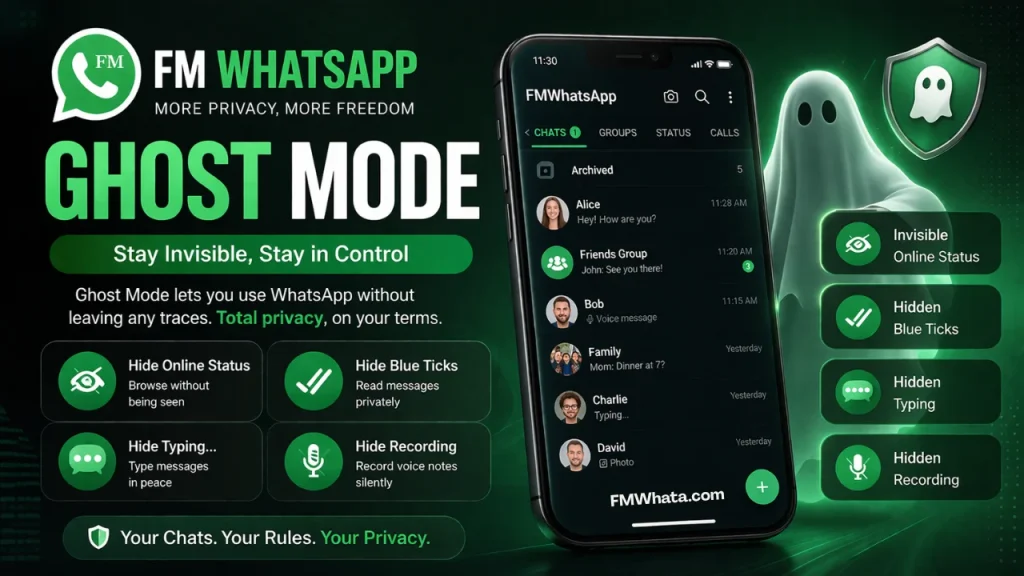
On the official WhatsApp, no. On GB WhatsApp, partly. But on FM WhatsApp, yes. Completely. And it is called Ghost Mode. Ghost Mode is one of the most powerful privacy features ever created for any messaging app. When you enable it, you become invisible. No one can see your activity. No one can track when you are online. No one can tell if you have read their messages. You can use WhatsApp freely without anyone watching over your shoulder.
In this guide, I will explain everything about Ghost Mode on FM WhatsApp. I will show you how to enable it. I will explain what it hides. I will compare it to GB WhatsApp. And I will share tips to get the most out of this amazing feature.
What Is Ghost Mode on FM WhatsApp?
Ghost Mode is not a single setting. It is a collection of privacy settings that work together. When you activate Ghost Mode, FM WhatsApp automatically enables multiple privacy features at once. You do not need to configure each setting individually. One tap and you become invisible.
Think of Ghost Mode as a master switch for privacy. It turns on everything you need to hide your activity. It turns off everything that could reveal your presence. The result is complete invisibility.
The name “Ghost Mode” is perfect. When you use it, you are like a ghost. You can see everything. You can read everything. You can move through the app freely. But no one can see you. No one knows you are there.
This is different from the official WhatsApp. On the official app, you cannot hide everything at once. You have to make trade-offs. Hide your last seen, but then you cannot see others’ last seen. Turn off read receipts, but then you cannot see when your messages are read.
Ghost Mode on FM WhatsApp removes all these trade-offs. You get complete privacy without losing any visibility.
What Does Ghost Mode Hide?
Let me give you a complete list. When Ghost Mode is enabled on FM WhatsApp, the following things are hidden from everyone:
Your Online Status: The green dot next to your name disappears. No one can see when you are actively using WhatsApp.
Your Last Seen: The timestamp that shows when you last opened WhatsApp is frozen or hidden. People cannot tell if you were online five minutes ago or five hours ago.
Your Blue Ticks (Read Receipts): When you read a message, the sender does not see blue ticks. They only see two grey ticks. They have no idea if you have opened their message.
Your Typing Indicator: When you are typing a message, the other person does not see the “typing…” notification. You can take your time composing messages without pressure.
Your Recording Indicator: When you are recording a voice message, the other person does not see the recording notification.
Your View Status: When you view someone’s status update, your name does not appear in the viewers list. You can watch any status completely invisibly.
Your Screenshot Alerts: On some versions of WhatsApp, taking a screenshot of a view-once media sends an alert. Ghost Mode prevents this alert.
That is seven different privacy features all activated with one setting. This is why FM WhatsApp users love Ghost Mode. It is simple. It is powerful. It just works.
How Ghost Mode Compares to GB WhatsApp Privacy Features
If you have used GB WhatsApp before, you know that it also offers privacy features. You can hide your online status. You can hide blue ticks. You can hide your last seen. But there is a big difference.
On GB WhatsApp, you have to enable each privacy feature individually. You have to go into settings, find each option, and turn it on one by one. This takes time. And if you miss one setting, your privacy has a hole.
On FM WhatsApp, Ghost Mode enables everything at once. One tap. Complete privacy. No missing settings. No holes.
Also, GB WhatsApp does not have a feature that hides all indicators simultaneously. The typing indicator and recording indicator are often still visible even when other privacy settings are enabled. Ghost Mode on FM WhatsApp hides these as well.
For users who value their privacy, FM WhatsApp with Ghost Mode is the clear winner.
Step-by-Step Guide to Enable Ghost Mode on FM WhatsApp
Now let me show you exactly how to enable Ghost Mode. The steps are very simple.
Step 1: Open FM WhatsApp
Open FM WhatsApp on your phone. Make sure you are on the main screen where you see your chats.
Step 2: Go to FM Settings
Look at the top right corner of the screen. You will see three dots or a menu icon. Tap on it. A menu will appear. From this menu, tap on “FM Settings” or “Fouad Mods.” This is where all the extra features are located.
Different versions of FM WhatsApp may use slightly different names. Some versions call it “Mods Settings” or “Advanced Settings.” Look for the option that clearly takes you to the modified features.
Step 3: Find Ghost Mode
Inside FM Settings, look for an option called “Ghost Mode” or “Ghost Mode Privacy.” On most versions, this is near the top of the privacy section. It may have a ghost icon next to it.
If you cannot find it immediately, look for a search icon. Many versions of FM WhatsApp let you search for settings by name. Type “Ghost” and the option should appear.
Step 4: Enable Ghost Mode
You will see a toggle switch or checkbox next to Ghost Mode. Tap it to turn Ghost Mode on. The switch will change color or position to show that it is enabled.
That is it. You are now in Ghost Mode. All your activity is hidden. You can use WhatsApp freely without anyone knowing.
Step 5: Verify That Ghost Mode Is Working
Always test new settings. Ask a friend to send you a message. Open the message. Then ask your friend to check if they saw blue ticks. They should see only grey ticks.
Next, ask your friend to check your online status. They should not see a green dot next to your name.
Finally, ask your friend to check their status viewers list after you view their status. Your name should not appear.
If all these tests pass, Ghost Mode is working correctly.
How to Turn Off Ghost Mode
Sometimes you want people to see your activity. Maybe you want your family to know you are online. Maybe you want your boss to see that you have read their message.
Turning off Ghost Mode is as easy as turning it on.
Go back to FM Settings > Ghost Mode. Tap the toggle switch to turn it off. Ghost Mode is now disabled. All your privacy settings return to their previous state.
You can turn Ghost Mode on and off as many times as you want. Some users turn it on during work hours and off during personal time. Others leave it on permanently. The choice is yours.
Customizing Ghost Mode
While Ghost Mode is designed to be a one-tap solution, FM WhatsApp also lets you customize it. You can choose which privacy features are included when you enable Ghost Mode.
Here is how to customize Ghost Mode:
Go to FM Settings > Ghost Mode. Instead of just tapping the toggle switch, look for a settings icon or an option called “Ghost Mode Settings” or “Configure Ghost Mode.”
Tap on it. You will see a list of all the privacy features. Each feature has a checkbox next to it. By default, all features are checked. This means when you enable Ghost Mode, all of these features are activated.
If you want Ghost Mode to hide only some features, uncheck the ones you do not want. For example, you might want to hide your online status but still show blue ticks. Uncheck the blue ticks option. Now when you enable Ghost Mode, your online status will be hidden but your read receipts will still work.
This customization makes Ghost Mode flexible. You can create your own perfect privacy setup and save it under the Ghost Mode name. One tap and your custom privacy settings apply.
Ghost Mode and Anti-Ban Protection
One concern many users have is whether using Ghost Mode will get their account banned. Let me address this honestly.
Using any modified version of WhatsApp carries some risk. WhatsApp’s terms of service do not allow third-party modifications. However, the FM WhatsApp developers have built in anti-ban measures. These measures hide the fact that you are using a modified app.
Ghost Mode itself is just a collection of privacy settings. These settings do not violate any specific rule. You are simply choosing to hide your activity. Many of these settings are available in the official WhatsApp, just not all at once.
Most FM WhatsApp users never experience a ban. Millions of people use Ghost Mode every day without problems. But you should know that the risk is never zero. Use FM WhatsApp responsibly. Keep regular backups of your chats. And have a plan in case something goes wrong.
Real-Life Scenarios Where Ghost Mode Is Useful
Let me share some real-life situations where Ghost Mode is incredibly useful.
Scenario 1: Late Night Reading
It is 2 AM. You cannot sleep. You open WhatsApp to read messages. But you do not want people to see that you are online at 2 AM. They might think you are strange. They might start messaging you. Ghost Mode lets you read in peace without anyone knowing.
Scenario 2: Avoiding Pressure at Work
Your boss sends you a message. You see it. But you need time to prepare a response. If your boss sees blue ticks, they will expect an immediate reply. With Ghost Mode, you can read the message, think about your response, and reply when you are ready. No pressure.
Scenario 3: Checking on an Ex
This is a sensitive one. You want to see what an ex is posting as status. But you do not want them to see your name in the viewers list. Ghost Mode lets you view their status completely invisibly. Your name never appears.
Scenario 4: Busy Family Time
It is dinner time with your family. You want to check your messages quickly. But you do not want friends to start messaging you because they see you online. Ghost Mode hides your online status. You can check messages without being disturbed.
Scenario 5: Customer Support Role
You are a customer support agent. You have hundreds of messages to read. If customers see blue ticks immediately, they will expect instant replies. Ghost Mode lets you read all messages first, prioritize them, and then reply in an organized way.
Common Problems with Ghost Mode and How to Fix Them
Sometimes Ghost Mode does not work as expected. Let me help you solve common problems.
Problem 1: People Can Still See Me Online
If people can still see your online status after enabling Ghost Mode, check your customization settings. Make sure “Hide Online Status” is checked in the Ghost Mode configuration. Also restart the app. Sometimes settings need a restart to apply.
Problem 2: Blue Ticks Still Appear
If people can see blue ticks, go back to Ghost Mode settings. Make sure “Hide Blue Ticks” is enabled. Also check if you have any conflicting settings in the regular privacy menu. Some settings might override Ghost Mode.
Problem 3: My Last Seen Is Still Visible
Freezing last seen can sometimes be tricky. Make sure you have enabled “Freeze Last Seen” in your Ghost Mode settings. Also check your phone’s date and time settings. Incorrect time settings can cause last seen to display incorrectly.
Problem 4: Ghost Mode Turns Off By Itself
If Ghost Mode disables itself, you may have an outdated version of FM WhatsApp. Update to the latest version. Also check if your phone has any battery optimization features that are closing FM WhatsApp in the background. Disable battery optimization for FM WhatsApp.
Problem 5: I Cannot Find Ghost Mode
If you cannot find Ghost Mode in your FM Settings, you may be using an older version of FM WhatsApp. Ghost Mode was added in newer versions. Update to the latest version. The feature should appear.
Ghost Mode vs Individual Privacy Settings
You might be wondering: Should I use Ghost Mode or configure each privacy setting individually?
Let me help you decide.
Use Ghost Mode if:
- You want complete privacy with one tap
- You are new to FM WhatsApp and want simplicity
- You do not need to customize which features are hidden
- You want to turn privacy on and off quickly
Use Individual Settings if:
- You want to hide only specific things
- You want different privacy levels for different situations
- You understand each privacy setting and want fine control
- You do not plan to turn privacy on and off frequently
Most users find that Ghost Mode is perfect for their needs. It is simple. It is effective. It just works. But if you are a power user who wants complete control, the individual settings are always available.
Tips for Using Ghost Mode Effectively
Let me share some advanced tips for using Ghost Mode.
Tip 1: Use Ghost Mode with DND Mode
Ghost Mode hides your presence. DND Mode stops messages from coming in. Together, they create complete isolation. Enable both when you need uninterrupted focus.
Tip 2: Create a Schedule for Ghost Mode
FM WhatsApp does not have a built-in schedule for Ghost Mode. But you can create a reminder on your phone. Set a reminder to turn on Ghost Mode every night at 10 PM. Set another reminder to turn it off every morning at 8 AM.
Tip 3: Test with a Trusted Friend
Before relying on Ghost Mode, test it thoroughly. Ask a trusted friend to help you. Check each privacy feature one by one. Make sure everything is hidden as expected.
Tip 4: Remember That Ghost Mode Is Not Perfect
No privacy feature is perfect. If someone is determined to know if you have read their message, they might find other ways. They might ask you directly. They might look at other signs. Use Ghost Mode as a tool, not as an absolute guarantee.
Tip 5: Be Respectful
Just because you can be invisible does not mean you should ignore people. Ghost Mode is for privacy, not for逃避 responsibility. Reply to messages in a reasonable time. Do not use invisibility as an excuse to avoid communication.
Frequently Asked Questions
Does Ghost Mode work for everyone?
Yes. Ghost Mode hides your activity from all your contacts. No one can see your online status, last seen, blue ticks, or typing indicator.
Can people tell I am using Ghost Mode?
No. Ghost Mode does not add any indicator or notification. People just see that you are offline, that your messages have not been read, and that your last seen is frozen. They cannot tell if you are using Ghost Mode or if you are simply not using WhatsApp.
Does Ghost Mode drain my battery?
No. Ghost Mode is just a collection of settings. It does not use extra battery. Your phone will last the same as before.
Can I use Ghost Mode on GB WhatsApp?
GB WhatsApp does not have a feature called Ghost Mode. You would need to enable each privacy setting individually. And some indicators like typing may still be visible.
Does Ghost Mode work on iPhone?
Yes. FM WhatsApp is available for iPhone. Ghost Mode is available on apple devices using FM WhatsApp.
Will Ghost Mode hide me from everyone including WhatsApp itself?
No. Ghost Mode hides your activity from other users. WhatsApp itself (the company) can still see your activity. No modified app can hide your activity from WhatsApp’s servers.
Can I still see others’ activity when Ghost Mode is on?
Yes. This is one of the best parts of Ghost Mode. You can hide your own activity while still seeing everyone else’s. You can see when they are online. You can see their blue ticks. You can see their last seen. You get full visibility while giving none.
Final Thoughts
Ghost Mode on FM WhatsApp is a privacy revolution. It gives you something that no official messaging app offers: complete invisibility with zero trade-offs.
You can read messages without sending blue ticks. You can be online without anyone seeing. You can type without pressure. You can view statuses without appearing in the viewers list. And you can do all of this while still seeing everyone else’s activity. The best part is the simplicity. One tap and you are invisible. One tap and you are visible again. No complicated settings. No confusing trade-offs. Just pure privacy.
If you value your privacy, Ghost Mode alone is worth switching to FM WhatsApp. GB WhatsApp users often switch when they discover this feature. The official WhatsApp feels naked and exposed in comparison. Enable Ghost Mode today. Become invisible. Read in peace. Reply on your own time. And enjoy the freedom of messaging without being watched.